
Bourne Green – Hook Norton Car Club HQ
Introduction
- Hook Norton Car Club is a community car club. It is run on a voluntary basis by its members for its members. It differs fundamentally from a commercial car hire firm in that our members are required to take care of our cars and ensure they are left in good state for use by the next member. Our cars are not checked by the Car Club’s volunteers between uses by members. Further details about the Club’s ethos and how it works can be found HERE.
- Bourne Green is the main base of Hook Norton Car Club and is where the majority of our vehicles are based.
- Information about the locations our vehicles are based at can be found at https://www.hn-lc.org.uk/locations
- Users should always check the published location of a vehicle before going to collect it in case it has been necessary to move it for operational reasons.
- Specific user instructions for all of our cars are available at https://www.hn-lc.org.uk/our-cars.
Location of Bourne Green
- Bourne Green is located at the end of Cascade Road, Hook Norton OX15 5FH. Road access to the site is only via Cascade Road.
- Pedestrian/bicycle access is also possible via the new pathway from The Bourne to the south and also from the Sports and Social Club car park to the west. These paths are shown on Google Maps.
- View location on Google Maps: https://maps.app.goo.gl/38AYUGXXvpFYAS8n6
- What3Words: https://w3w.co/tailors.shipyards.people
Electric Vehicle Charging Points
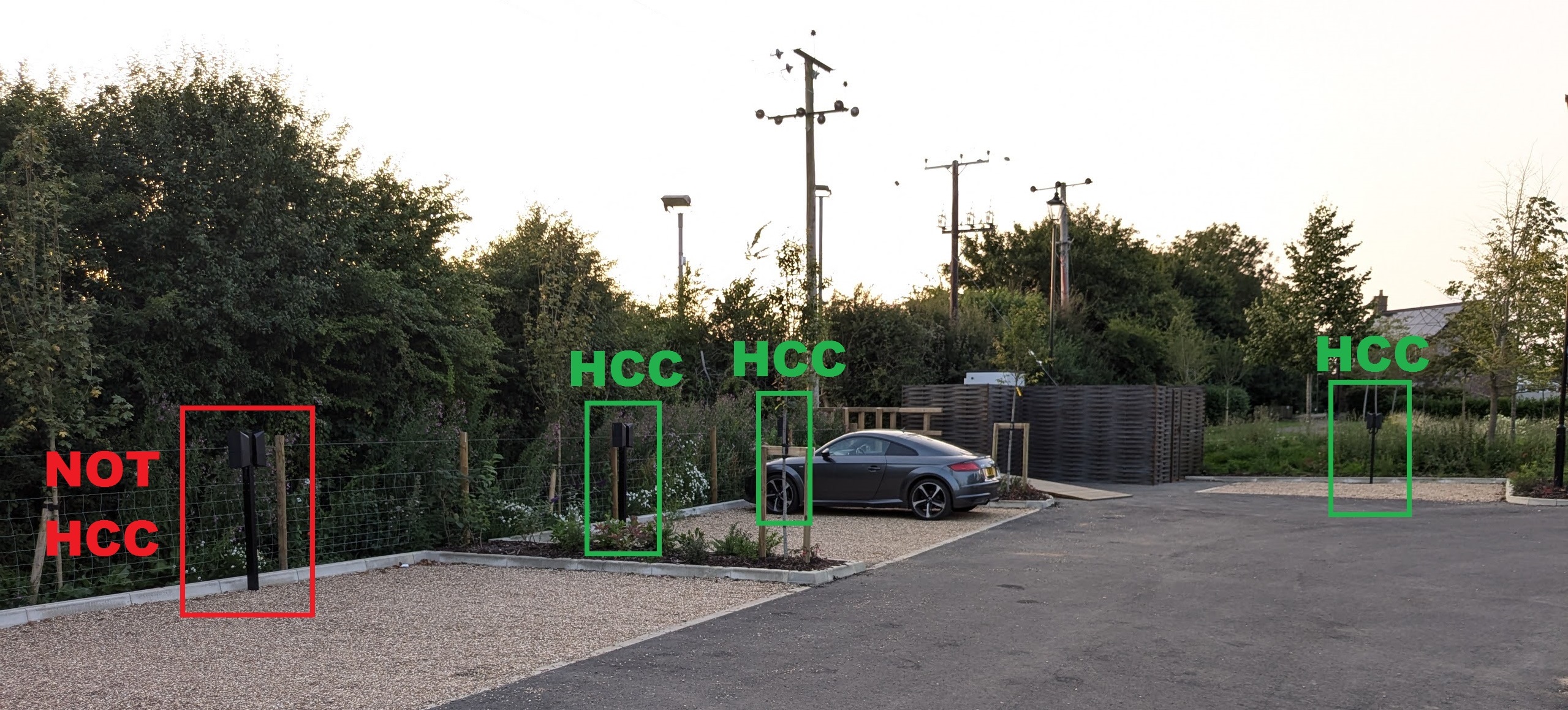
- There are seven Electric Vehicle Charging Points (“EVCPs“) at Bourne Green. Five of them are for the exclusive use of the Car Club, and two are for the exclusive use of registered Bourne Green residents. A photo showing the location of the EVCPs can be viewed HERE.
- The seven EVCPs are connected to, and controlled by, a cutting-edge smart microgrid. Further information about the Bourne Green smart microgrid can be found HERE.
- The EVCPs at Bourne Green are advanced Teltonika Teltocharge units.
Collecting a Vehicle
Your Obligations
- Membership of the Hook Norton Car Club and use of its vehicles requires members to accept and agree to the Car Club’s Terms and Conditions at all times.
- Any member who uses the Car Club’s vehicles must at all times ensure they comply with their obligations arising from both statute and from their acceptance of the Club’s Terms and Conditions. Those obligations are summarised HERE.
Accessing Vehicle Keys
Information regarding the location of the keys for vehicles kept at Bourne Green can be found on a separate, password-protected page. Details of how to access this page are found at the top of the Booking Schedule.
Disconnecting a Vehicle from an Electric Vehicle Charging Point
At the start of a rental it will be necessary to disconnect and store the charging cable connected between the car and an adjacent Electric Vehicle Charging Point (“EVCP“). Cables must not be left connected to an EVCP when a car is collected and should be stored in the boot of the car when not in use.
Both the cars and EVCPs are fitted with cable locks which prevent unauthorised removal of our charging cables. As a general rule, pressing and holding the cable release button or the vehicle unlock button on the vehicle key fob will unlock the cable which should be disconnected within 10 seconds else the vehicle’s cable lock may re-engage.
The procedure for disconnecting a charging cable is as follows:
- Release the vehicle’s cable lock and unplug the charging cable from the car within ten seconds. Details of how to release the cable lock can be found on the relevant vehicle information page.
- Replace the car’s charging port cover to prevent water ingress and close the external charging flap. Specific instructions on how to do this for each of our cars can be found on the applicable vehicle information page.
- Once a cable is disconnected from a car, the EVCP cable lock will automatically release and allow the removal of the cable from the EVCP. Disconnect the cable from the EVCP and close the flap on the EVCP to prevent water ingress. Failure to close the EVCP flap may result in an administration charge being applied to your account.
- Place the cable in the vehicle boot. Under no circumstances should a charging cable be left plugged into an EVCP at Bourne Green whilst not plugged into a car. If you take a car and forget to take the charging cable with you an administration charge may be applied to your account.
Charging cables should always be disconnected from the vehicle before unplugging from an EVCP and then immediately stored in the vehicle’s boot.
Start of Rental Checks
- Before driving one of our vehicles, you must ensure that you carry out the Start of Rental Checks listed HERE.
- You must complete the relevant line on the tripsheet at the start of your rental, noting the condition in which you found the vehicle, and then sign to confirm your entries.
- If the checks reveal any issues, you must take photographs of the issue(s) and the vehicle’s odometer (mileage counter) before using the vehicle and report the matter to the Car Club within 24 hours.
- Note on the trip sheet and contact the Car Club immediately if you had any issues or concerns about the car, including but not limited to:
- safety or roadworthiness, including windscreen washer fluid levels
- damage or maintenance, including unexpected noises or vehicle behaviour
- warning lights or messages displayed on the dashboard, including
- tyre pressure warnings
- key fob battery level
- vehicle not fully charged and there is insufficient range available for your journey as a result
- The Car Club’s contact details can always be found on the trip sheets inside the vehicles.
Failure to promptly report any issues with our cars to the Car Club may result in an administration charge being applied to your account and may prejudice your ability to demonstrate that you were not responsible for any damage or issues reported by other users.
Using a Vehicle
In reserving and using our vehicles you agree to abide by the Car Club’s policies. These include restrictions on:
- food and drink consumption;
- carrying of pets; and
- carrying of goods or materials in our vehicles.
Please ensure that you familiarise yourself with, and abide by, the Car Club’s policies when using our vehicles. Failure to do so may result in an administration and/or cleaning charge being applied to your account. Repeated failure to comply with these policies may result in suspension of your membership of the Car Club.
Returning a Vehicle
Return Checks and Tripsheet
- Upon returning a car members are required to complete the End of Rental Checks listed HERE.
- You must complete the relevant line on the tripsheet at the end of your rental, noting the condition in which you have returned the vehicle and then sign to confirm your entries.
- The next person to use the car will be the next scheduled user and not a member of the Car Club administration team. Ensure that you leave the car in a proper state for them:
- Leave no traces of:
- food and/or drink (including crumbs, residue or wrappers)
- pets (including hair, dander, paw prints or odours)
- goods or material carried in the vehicle (including pine needles, hay/straw, dust or dirt)
- If you have been carrying children in the rear please ensure that you double-check the rear seat for any:
- traces of food and drink, including food wrappers or lollypop sticks in the rear door bins
- mud or dirt from their shoes that they may have inadvertently got on the backs of the front seat – use a cleaning wipe from the car if necessary
- Leave no traces of:
- Note on the trip sheet and contact the Car Club immediately if you had any issues or concerns about the car, including but not limited to:
- safety or roadworthiness, including windscreen washer fluid levels
- damage or maintenance, including unexpected noises or vehicle behaviour
- warning lights or messages displayed on the dashboard, including
- tyre pressure warnings
- key fob battery level
- Failure to report any issues about our cars to the Car Club may result in an administration charge being applied to your account.
Connecting a Vehicle to an EVCP
To charge a vehicle it is necessary to connect it to an operative EVCP and start a charging session using an RFID card.
The charging session will not start automatically upon a vehicle being connected to the EVCP. This prevents unauthorised use of the Car Club’s EVCPs by third parties.
The procedure for connecting a vehicle to an EVCP and starting a charging session is as follows:
- Park the vehicle in the same parking space as the one you collected it from and facing in the direction such that the vehicle’s charging port is as close as possible to the EVCP post. If you are unable to park in the same space for any reason, such as there is now another car parked in the space, please take a photograph of the impediment and contact the Car Club to advise which space our car is now parked in as this assists us with remote monitoring of the site and the EVCPs.
- Select the EVCP that is closest to where the car is parked and ensure it is displaying six pulsing white LED lights on the front [see Fig 1 below] – these indicate that the EVCP is operative and available for use.
- Open the car’s charging port flap and remove the charging port cover, taking care where the port cover is in two parts to only remove the upper part to enable the cable to plug in. Specific instructions on how to do this for each of our cars can be found on the applicable vehicle information page.
- Take the vehicle’s charging cable which you previously stored in the boot and fully insert the plug on the relevant end of the cable fully into the car’s charging socket. Failure to fully insert the plug will prevent the car from charging which may result in an administration charge being applied to your account.
- Ensure that any knots, coils or tangles are removed from the cable as these can place strain on the cable and result in heat being generated in the cable during charging due to electromagnetic induction. Failure to take care of the cable in this way may result in an administration charge being applied to your account.
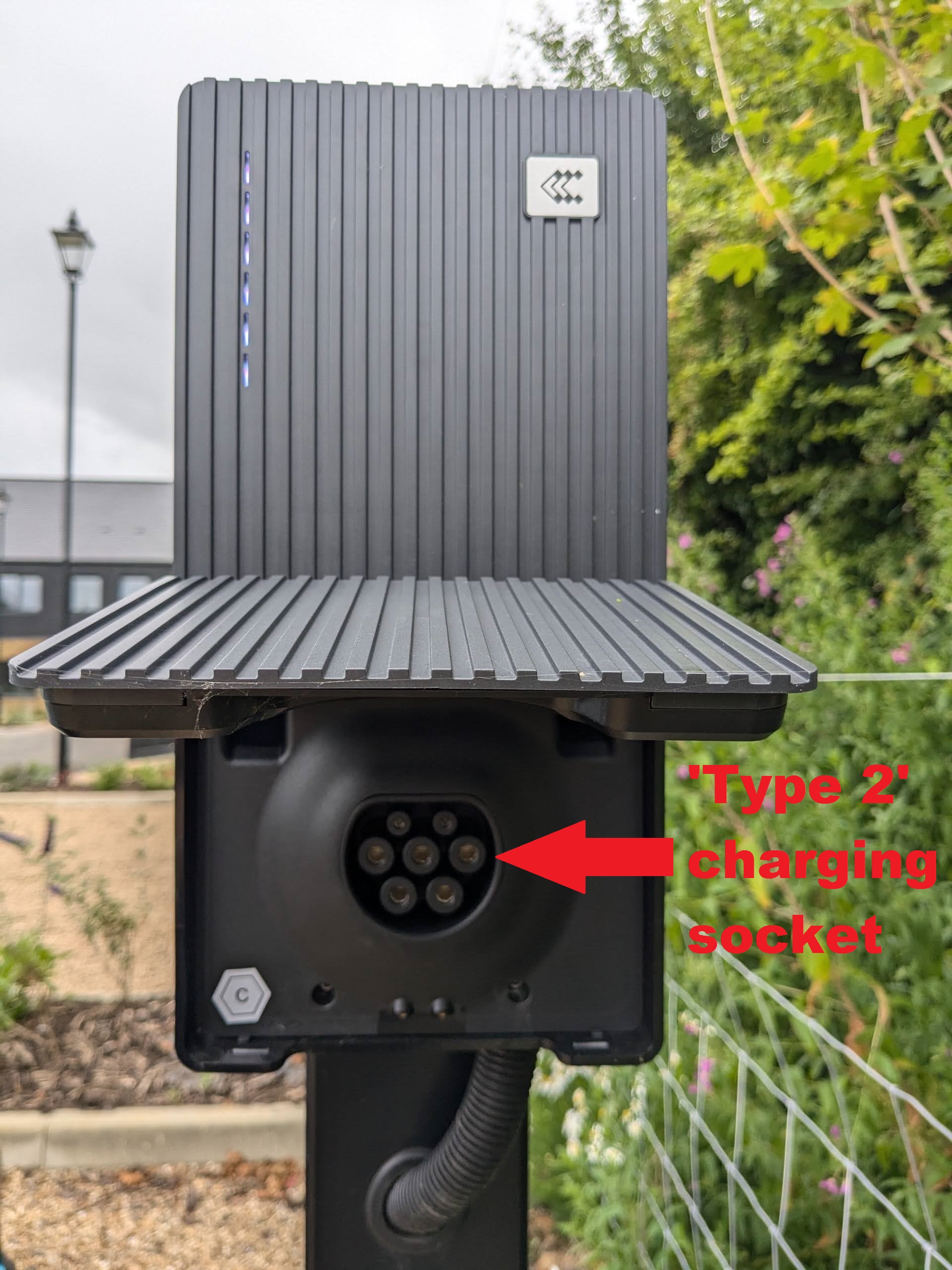
- Once the cable is properly connected to the car and has been straightened, the ‘Type 2’ socket on the nearest EVCP will need to be accessed. The socket is covered by a corrugated black plastic flap which also forms the lower half of the EVCP’s front cover. Gently pull the bottom edge of the front of the EVCP forwards to expose the charging socket, as shown in Fig 2 below.
- Fully insert the relevant end of the charging cable into the EVCP Type 2 socket. Failure to fully insert the plug will prevent the car from charging which may result in an administration charge being applied to your account.
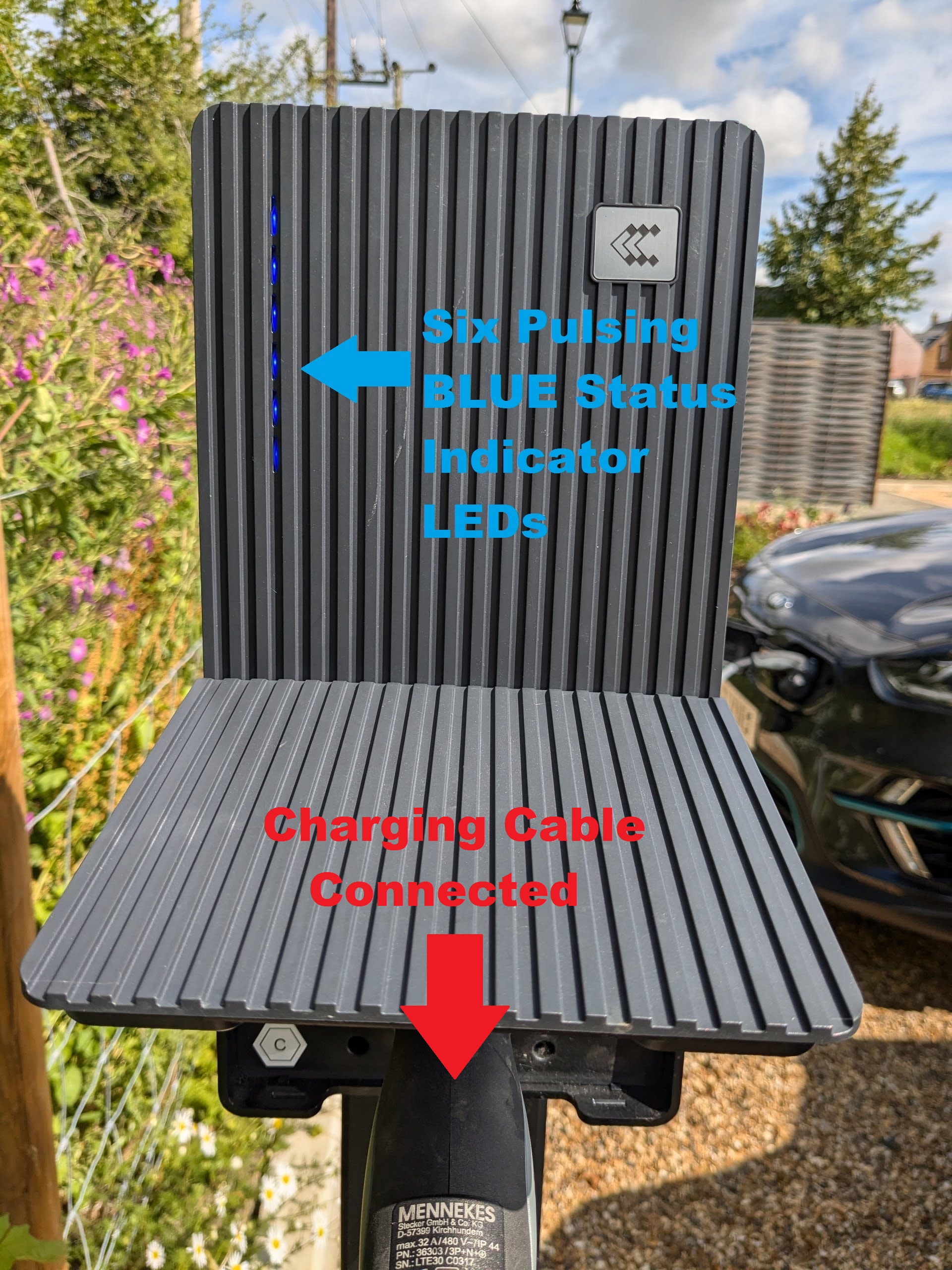
- Ensure that six pulsing blue LEDs are now displayed on the front of the EVCP as shown in Fig 3 below. If not, check that the cable is fully inserted on both ends. If you cannot get six pulsing blue LEDs to appear at this stage, please stop and contact the Car Club for assistance.
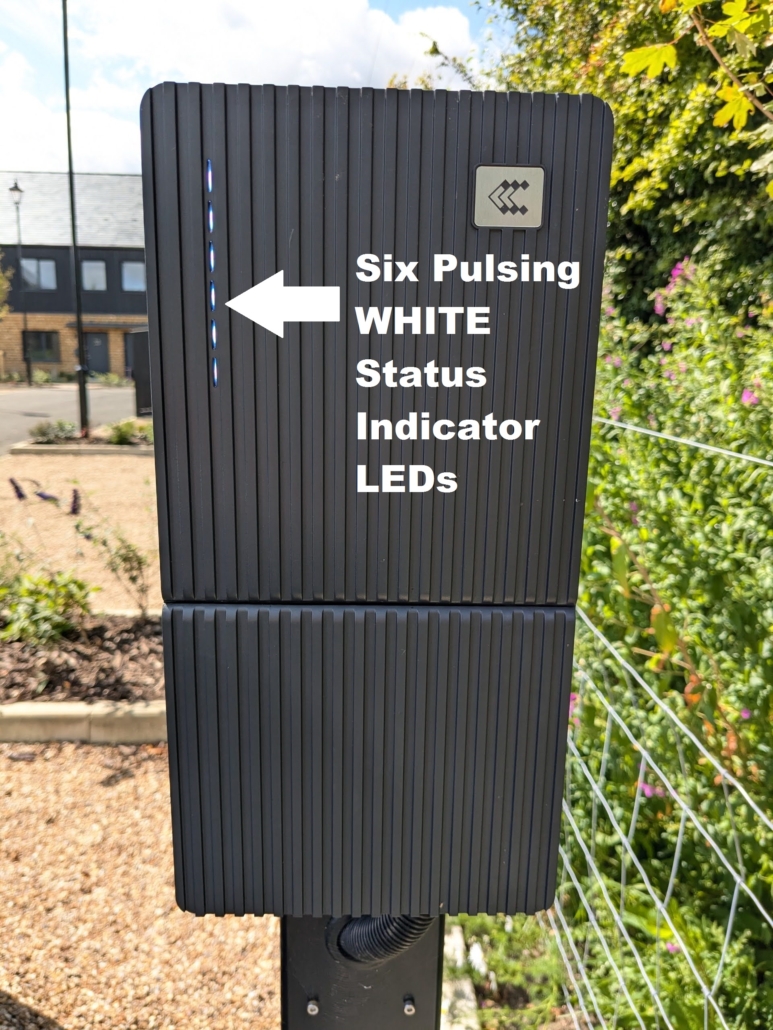
Fig 1 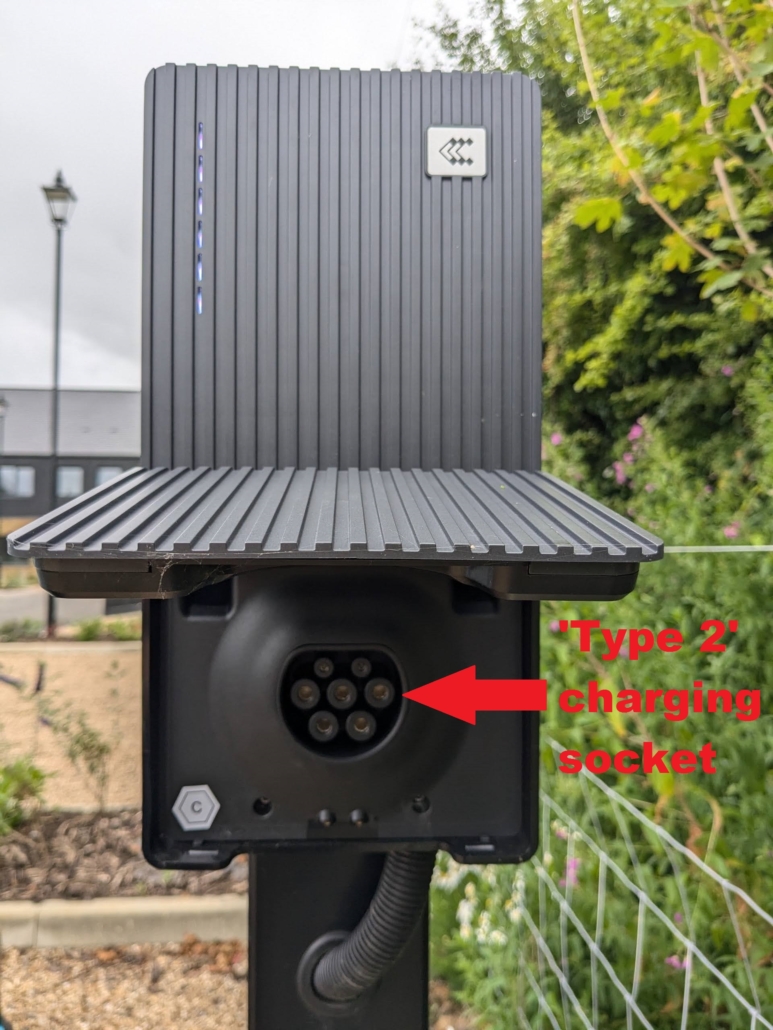
Fig 2 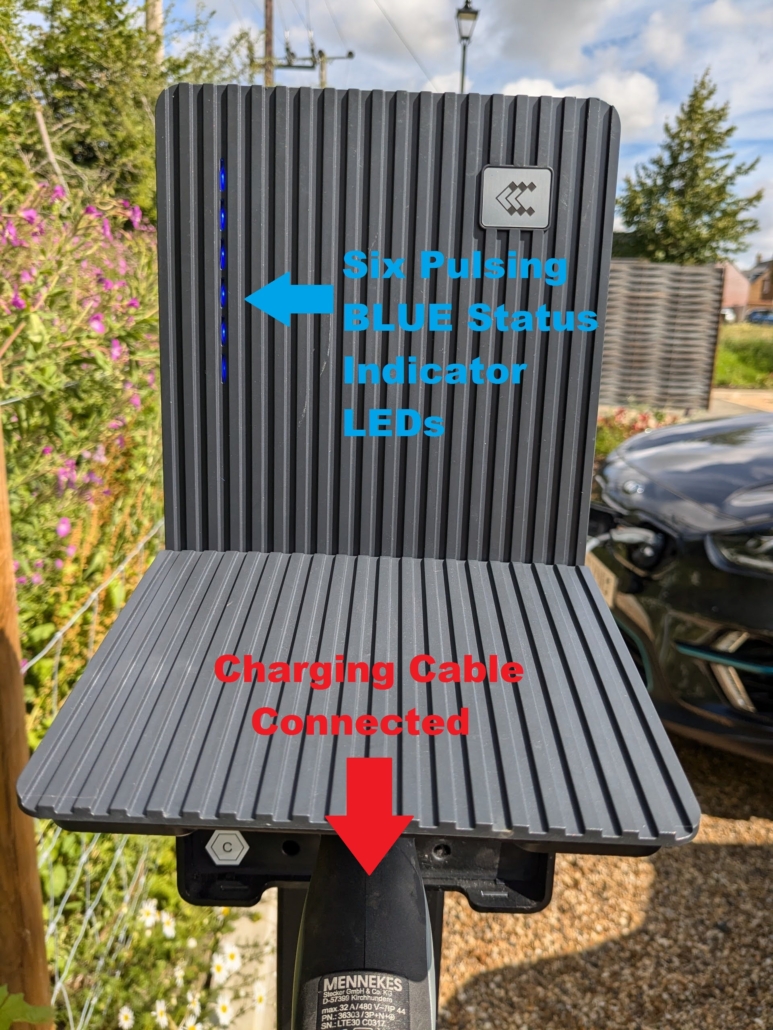
Fig 3
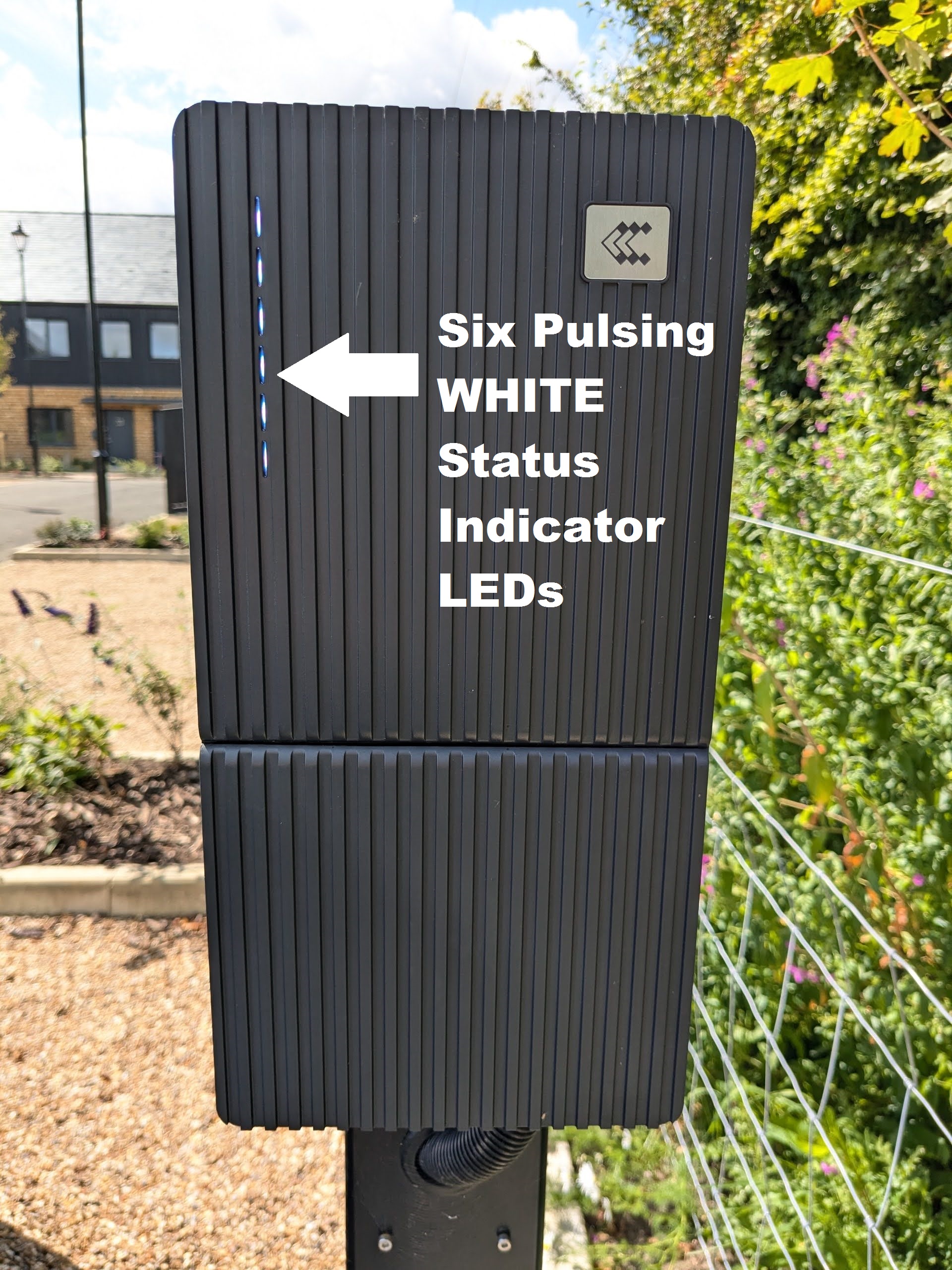
Starting a Charging Session
Once six blue LEDs are displayed on the EVCP it is necessary to use a radio frequency identification (“RFID”) card or tag to start a charging session. This step prevents unauthorised use of the EVCPs by non-Car Club vehicles. Each vehicle based at Bourne Green has been equipped with an RFID card (see Fig 4) which must be stored in the glovebox of the vehicle and an RFID tag (see Fig 5) which is attached to the vehicle key fob.
The procedure for starting a charging session is as follows:
- Verify that six pulsing blue LEDs are shown on the EVCP as shown in Fig 3 above. If not, ensure that the plugs on the ends of the charging cable are fully inserted into both the car and the EVCP. If you cannot get six pulsing blue LEDs to appear, do not proceed and contact the Car Club for assistance.
- To start a charging session take either the RFID card (vehicle glovebox) or the RFID key tag (vehicle key fob) and place it against the RFID sensor on the left hand side of the EVCP. The RFID sensor location is clearly marked on the side of the EVCP as shown by the symbol in Fig 6.
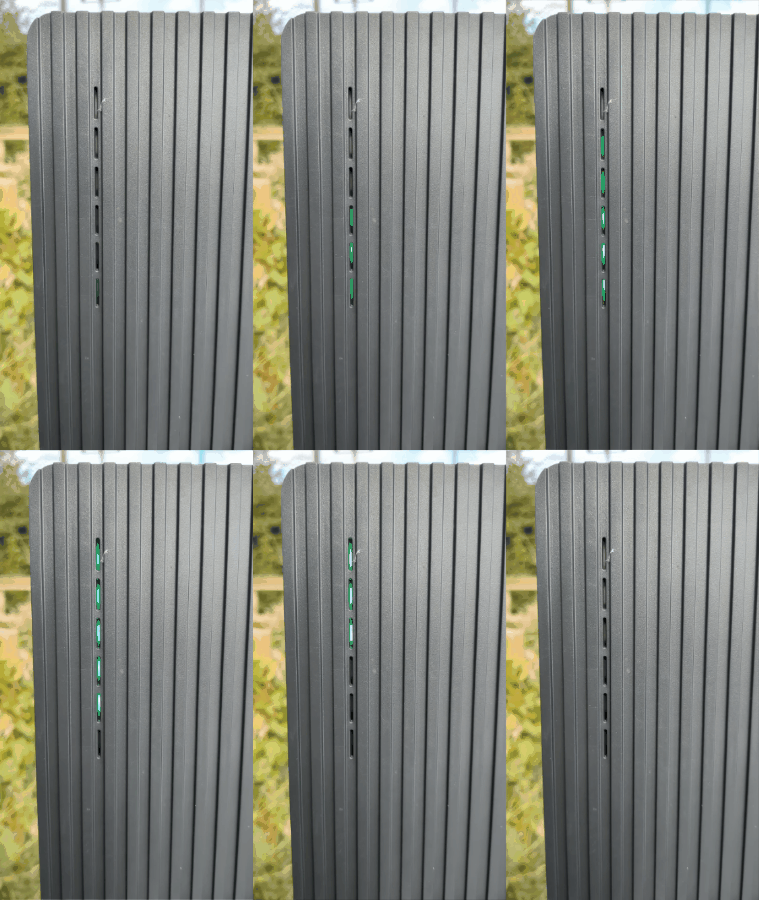
- The EVCP and car will then undertake a series of checks which will result in several different colours and patterns being displayed by the LED status indicator lights as shown in the video in Fig 7.
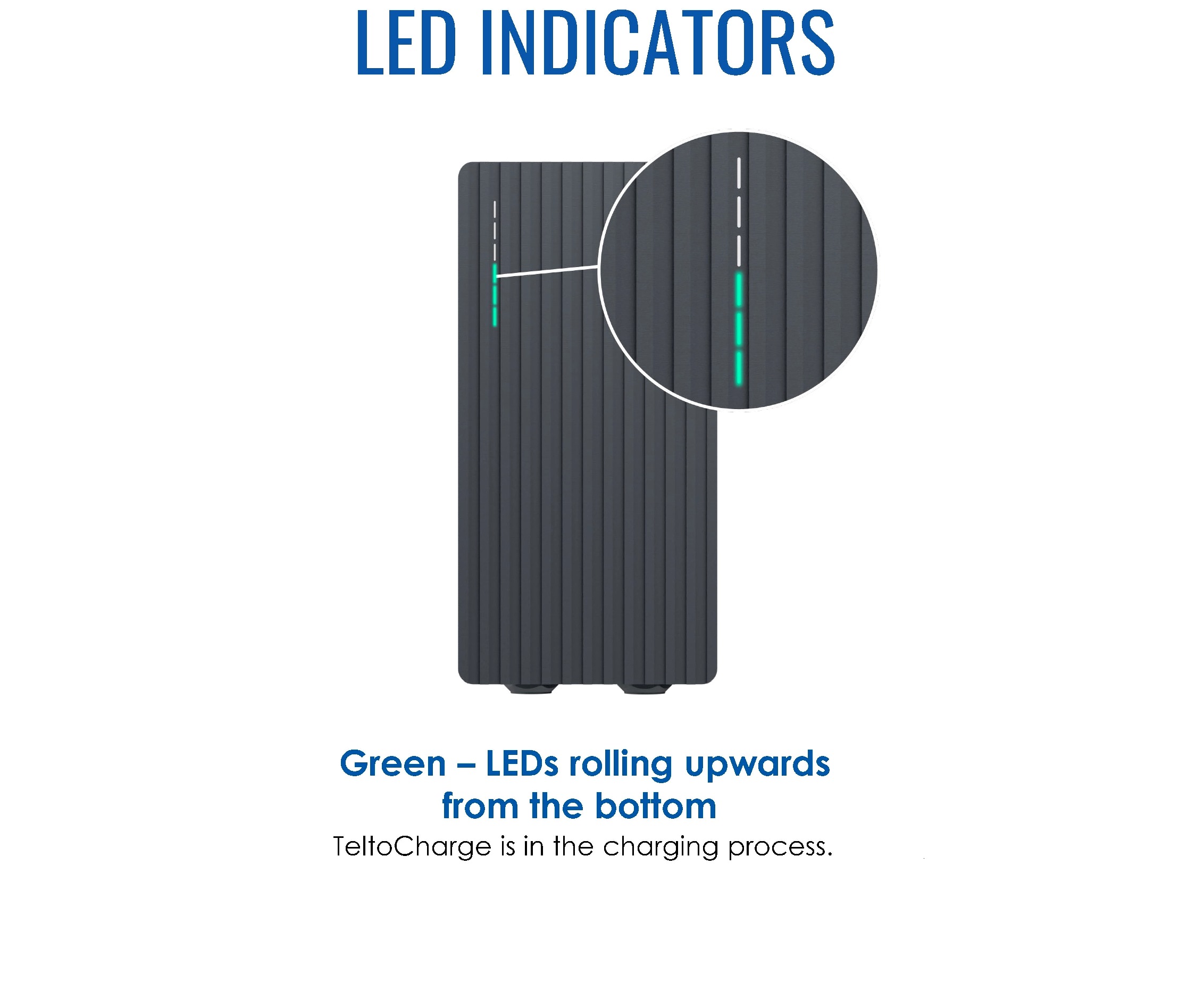
- If, and only if, the car begins charging the EVCP LEDs will display a green pattern that actively rolls in an upwards direction on a sustained basis as shown in the video in Fig 7, the image in Fig 8 and the looped video in Fig 9. The green LEDs must show an actively upwards rolling pattern as shown in the looped video in Fig 9 to indicate that the car is charging. Stationary green LEDs do NOT indicate that charging is in progress, nor do any other colours or patterns.
- Additionally, check the vehicle’s onboard charging indicator to ensure that it is actively charging (and not just showing that it is connected to an EVCP). Details of how each of our vehicles display that they are actively charging can be found HERE.
- If the both the EVCP and vehicle show that they are actively charging, mark the appropriate box on the vehicle tripsheet (if applicable).
- Lock the vehicle and note that that if you unlock it again for any reason this may cancel the charging session. This will require you to complete the above steps again to restart the a new charging session.
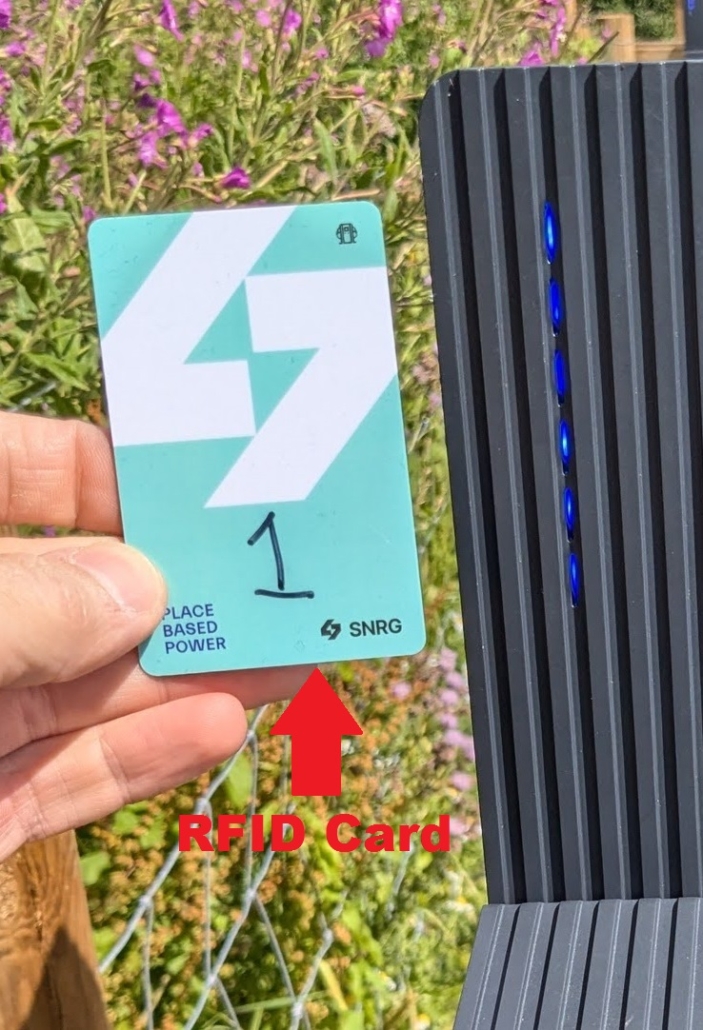
Fig 4 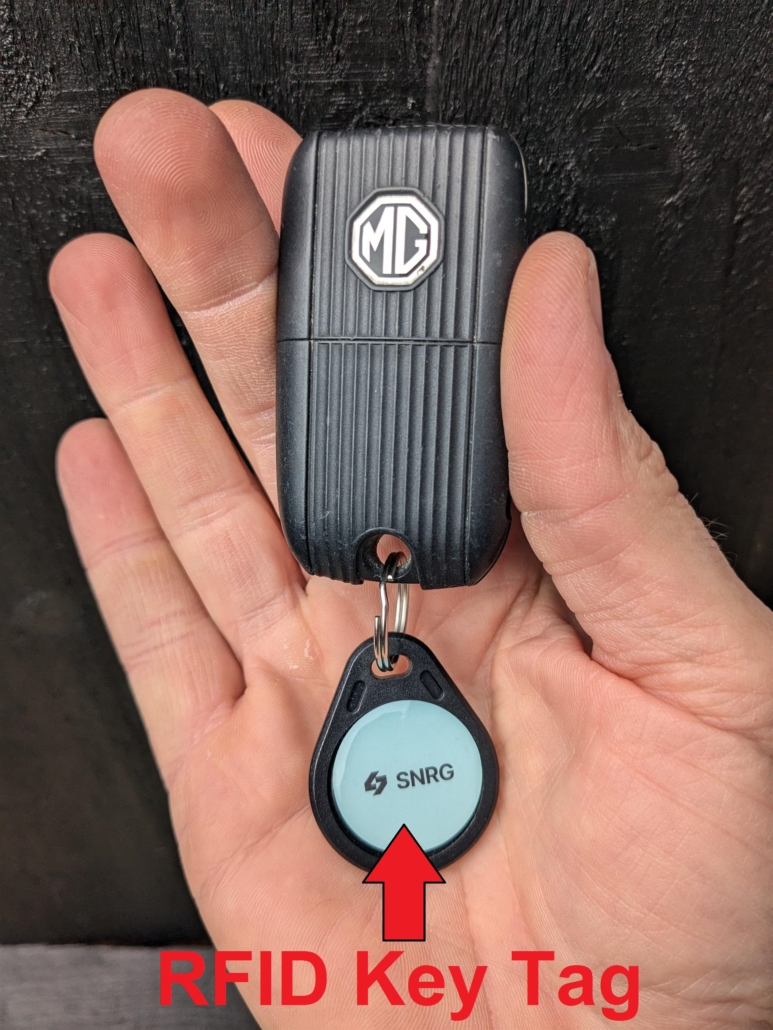
Fig 5 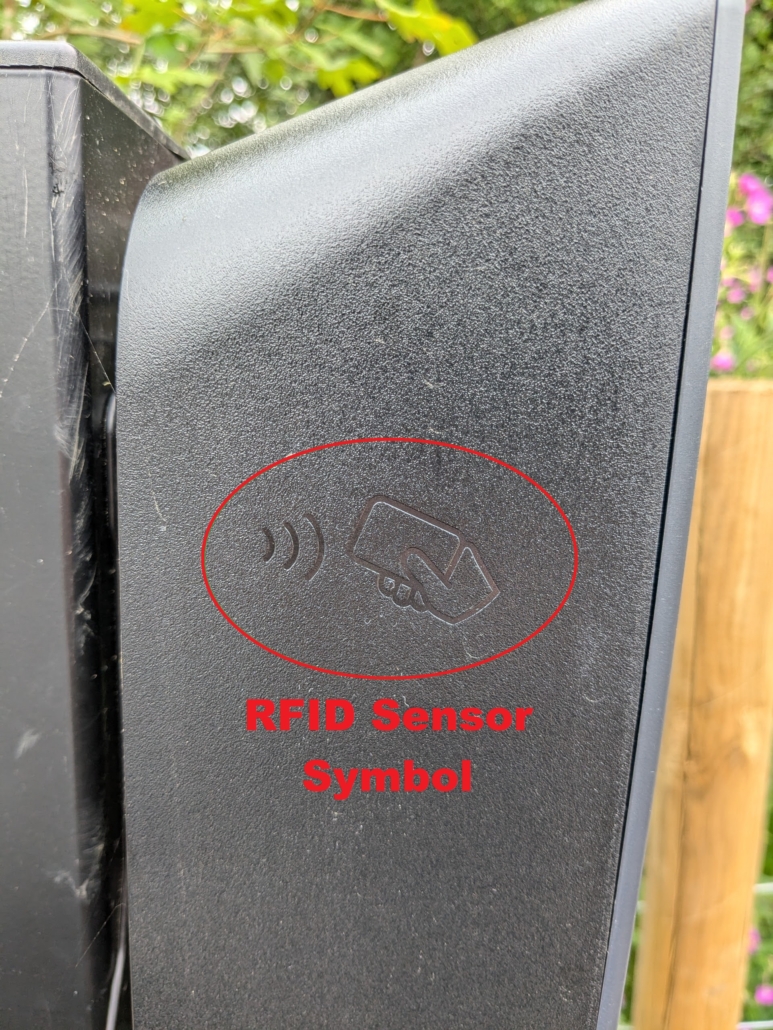
Fig 6
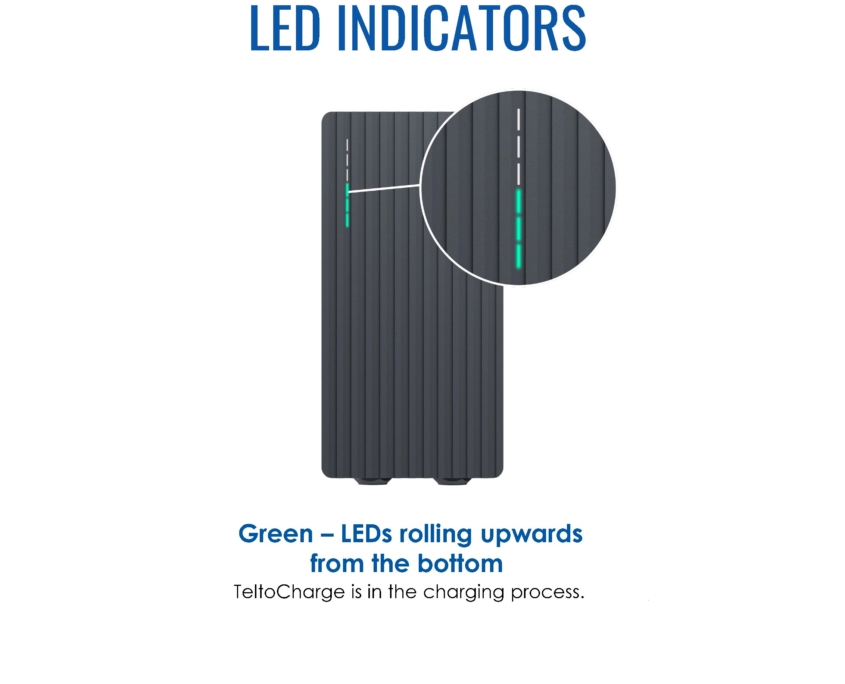
Fig 8 
Fig 9 – CLICK FOR ANIMATION
Final Checks
In order to ensure that the car is charging and will be ready for the next user, it is essential to undertake the following two checks after returning a car:
- verify that the LEDs shown on the front of the EVCPs display a green pattern that actively rolls in an upwards direction as shown in Fig 8 and Fig 9 above; and
- verify that the vehicle-specific charging indicator shows that it is actively charging. A summary of the vehicle-specific charging indicators for all of our cars can be found HERE.
If either check does not indicate that a car is actively charging, check again that:
- both ends of the charging cable are fully inserted (wiggle & push the plugs to be certain);
- the vehicle is fully switched off and locked; and
- the RFID card has again been placed and held against the RFID sensor on the EVCP after undertaking the above two checks.
If you have checked the above and you are still unable to get a car to charge, it is essential that you inform the Car Club by email within an hour of returning the car.
If you unlock the car for any reason after you complete the Final Checks it may cause the charging session to end. If you do unlock the car at this time, you must complete the Final Checks again.
Ensuring that returned cars are left actively charging is one of the most important obligations of Car Club membership. Failure to leave a car charging may prevent the next user from being able to use a car and prevents the proper operation of the Car Club. From 08 October 2024, failure to successfully start a charging session or promptly notify the Car Club to this effect may incur an administration charge.
Returning Vehicle Keys
Only after completing the aforementioned Final Checks and ensuring that the vehicle charging session has been active for at least one minute should the vehicle key be returned to the Master Lock key safe. Details of the operation of the Master Lock key safe can be found above. After returning the vehicle key to the key safe, please ensure that
- the key safe combination code is scrambled; and
- the sliding cover is locked closed by lifting it up and to the left.
Important Notes
- Failure to comply with any of these instructions may result in an administration charge being applied to your account.
- Always double-check that a vehicle is actively charging when you return it to avoid an administration charge.
- Report any issues to the cars as soon as possible and always within one hour of returning a vehicle.
- Remove any tangles, knots or coils from charging cables before plugging into an EVCP.
- Return the RFID card to the vehicle glovebox.
- Close the socket covers on the EVCPs and cars when not connected.
- Lock the gate used to access the key safes using the top sliding bolt to prevent access by children.
- Remember that in signing a vehicle trip sheet you are confirming that there are no issues with a car save as for those you record on the trip sheet.